

Looking for Hoverify Lifetime deal?
How to get the Hoverify lifetime deal
If you would like to buy a lifetime deal on Hoverify, make a request here. When the deal goes live, you will receive an email from us notifying you about it.
You can increase the chances of getting this lifetime deal by sharing this page with your friends and colleagues and encouraging them to request Hoverify LTD.
The more requests we receive, the better the chances of securing the deal for you.
Request
⇢
Share
⇢
Get Notified
Share with your friends to reach the goal!
Share and get your friends to request this deal to increase the chances of getting this lifetime deal
What is Hoverify?
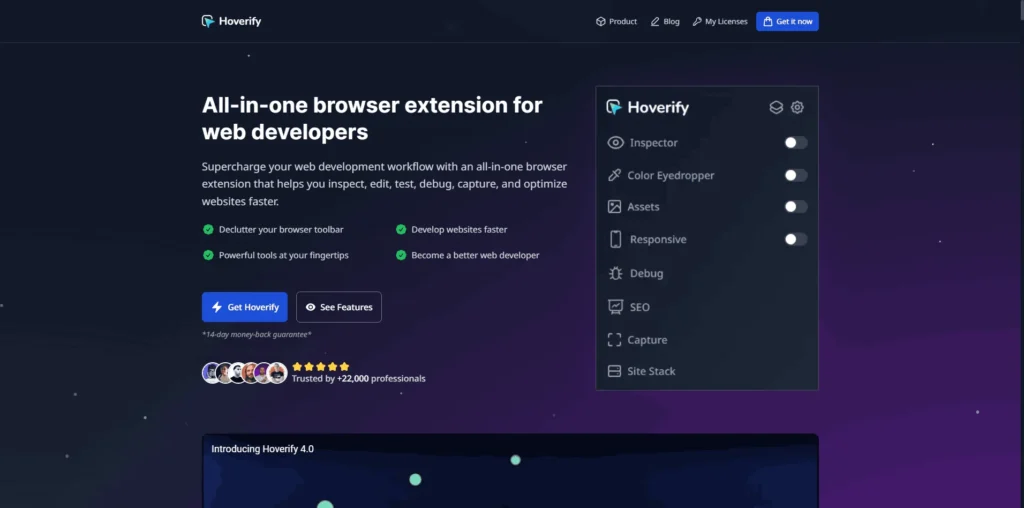
Hoverify is an all-in-one browser extension for web developers and designers that helps inspect, edit, test, debug, capture, and optimize websites directly from the browser.
It combines multiple developer tools into a single extension, allowing users to work faster without constantly switching between DevTools and separate browser extensions.
Hoverify covers several essential parts of the web development workflow, from inspecting HTML and CSS, editing elements in real time, testing responsive layouts, extracting website assets, identifying a site’s technology stack, analyzing SEO and Core Web Vitals, to capturing high-quality screenshots.
Hoverify Plans and Pricing
Hoverify Use Cases
Website Inspection and Debugging: Hoverify allows developers to inspect HTML, CSS, and page elements directly from the browser. Real-time editing and debugging help identify issues quickly without constantly switching between different developer tools.
Frontend Development: Frontend developers can test CSS changes, inspect layouts, analyze page structure, and troubleshoot design issues while building responsive websites. This speeds up the development process and improves workflow efficiency.
Responsive Design Testing: Designers and developers can preview websites across multiple screen sizes to ensure layouts display correctly on desktops, tablets, and mobile devices. This helps identify responsiveness issues before deployment.
4Design Inspiration and Asset Extraction: Designers can inspect fonts, colors, spacing, images, and other design assets from any website. Hoverify makes it easy to analyze existing designs and gather inspiration for new projects.
SEO and Performance Analysis: SEO professionals can evaluate on-page SEO elements, Core Web Vitals, metadata, and website technologies directly within the browser. This simplifies technical website audits and optimization efforts.
Who is Hoverify ideal for?
Frontend Developers: Hoverify is ideal for frontend developers who need to inspect, debug, and edit websites efficiently. Its all-in-one browser toolkit simplifies HTML and CSS inspection, responsive testing, and real-time debugging without relying on multiple extensions.
Web Designers: Designers can use Hoverify to inspect fonts, colors, spacing, and layouts while extracting design assets and finding inspiration from existing websites. This helps streamline the design process and maintain consistency across projects.
Digital Agencies: Agencies managing multiple client websites can use Hoverify to accelerate development, design reviews, website audits, and debugging. Its unified toolset improves productivity while reducing the need for separate browser extensions.
QA Engineers and Testers: Quality assurance teams can inspect page elements, verify responsive behavior, identify UI issues, and capture screenshots for bug reports. Hoverify simplifies website testing throughout the development lifecycle.
SEO Professionals: SEO specialists can perform technical website audits by analyzing metadata, Core Web Vitals, page structure, and the technologies behind a website. This helps identify optimization opportunities without leaving the browser.
Hoverify Key Features
HTML and CSS Inspector
Real-Time CSS Editing
Responsive Design Testing
Website Technology Detection
Color Picker
Font Inspector
Asset Extraction
SEO Analysis
Core Web Vitals Insights
Screenshot Capture
VisBug: An open-source browser extension that allows designers and developers to inspect, edit, and experiment with website layouts directly in the browser.
CSS Scan: A powerful browser extension for inspecting, copying, and analyzing CSS properties from any website with a single click.
Wappalyzer: A technology profiling tool that identifies the frameworks, CMS platforms, analytics tools, and technologies powering any website.
BuiltWith: A website technology lookup platform that provides detailed insights into the software stack, hosting, marketing tools, and infrastructure behind websites.
Web Developer: One of the most established browser extensions for web developers, offering a wide range of tools for inspecting, debugging, validating, and testing websites.
Hoverify is an excellent choice for developers and designers who want an all-in-one browser toolkit for website inspection, debugging, design analysis, and performance optimization. However, these alternatives offer similar capabilities with different feature sets and specialized workflows.
Hoverify alternatives and competitors
Why we can get Hoverify
Be the first to know when Hoverify LTD goes live!
At Prime, we do the impossible very often!
What LTD fans say about Prime Club:
Prime Club is my go-to for LTDs. Dev curates quality lifetime deals, including big brands like SpyFu. Excellent platform and great value!”
Prime Club definitely has a bright future and eventually will become the most trustable brand in the Lifetime deal community.
You’ll be the first to know the moment they launch!
Request for a Hoverify lifetime deal
Be the first to know when we launch this deal
- Terms of use
- Privacy Policy
- ©2026 | Crafted with love