

Looking for StepGrab Lifetime deal?
How to get the StepGrab lifetime deal
If you would like to buy a lifetime deal on StepGrab, make a request here. When the deal is live, you will receive an email from us notifying you about it.
You can increase the chances of getting this lifetime deal by sharing this page with your friends and colleagues and encouraging them to make a request for StepGrab LTD.
The more requests we receive, the better the chances of securing the deal for you.
Request
⇢
Share
⇢
Get Notified
Share with your friends to reach the goal!
Share and get your friends to request this deal to increase the chances of getting this lifetime deal
What is StepGrab?
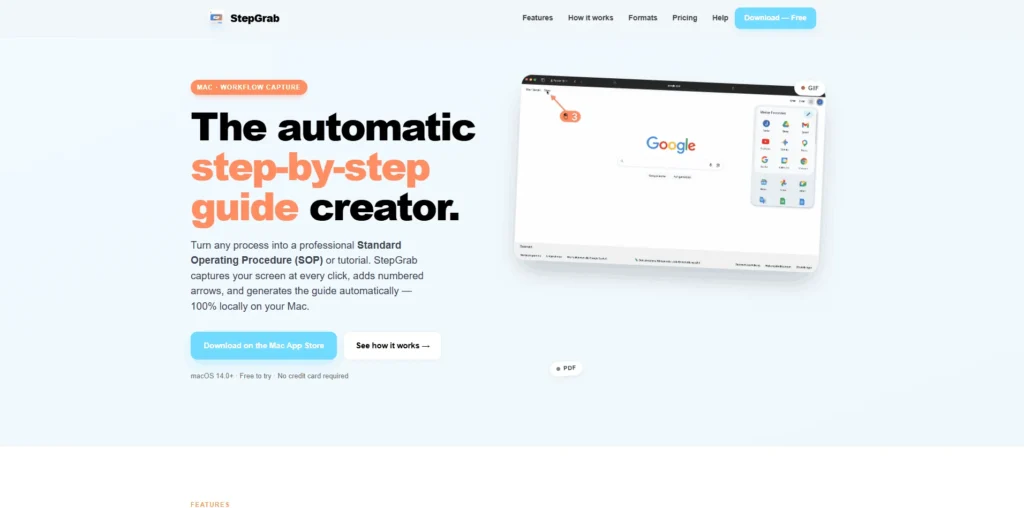
StepGrab is a native macOS app that automatically turns screen recordings into professional step-by-step guides, SOPs, and tutorials.
It captures your screen at every click, adds numbered annotations and captions, and creates a polished guide without requiring you to take and edit screenshots manually.
StepGrab covers several parts of the documentation process, from automatically capturing each step of a workflow to refining screenshots, adding annotations, and exporting the finished guide as a PDF, GIF, or MP4. It runs entirely on your Mac, so recordings and screenshots stay on your device.
StepGrab Plans and Pricing
StepGrab Use Cases
Creating SOPs: Teams can use StepGrab to document repetitive workflows and turn them into clear standard operating procedures. This makes it easier for employees to follow consistent processes without needing someone to explain each step manually.
Employee Onboarding: Companies can create visual onboarding guides that show new employees exactly how to complete common tasks. Instead of relying only on written instructions, teams can provide step-by-step screenshots and annotations.
Software Tutorials: Software companies and educators can use StepGrab to create tutorials that demonstrate how to use an application. Screen recordings can be converted into structured guides that make complex workflows easier to understand.
Customer Support Documentation: Support teams can create visual help guides showing customers how to complete specific tasks or troubleshoot common issues. This can reduce the need to repeatedly explain the same workflow through support conversations.
Training Materials: Businesses can turn internal workflows into reusable training materials for employees. Step-by-step guides can help teams learn new software, tools, and processes at their own pace.
Who is StepGrab ideal for?
Software Companies: StepGrab is ideal for software companies that need to create clear tutorials and documentation for their products. Teams can capture workflows and turn them into visual guides that help users understand how to use different features.
Support Teams: Customer support teams can use StepGrab to create step-by-step troubleshooting guides and help documentation. Visual instructions can make it easier for customers to follow solutions without requiring lengthy explanations from support agents.
HR and Training Teams: HR and training teams can create onboarding and training materials that demonstrate internal processes. This helps new employees understand software workflows and company procedures more quickly.
SaaS Teams: SaaS companies can use StepGrab to document product workflows, create user tutorials, and build knowledge-base content. This is particularly useful for explaining multi-step processes inside their applications.
Developers and QA Teams: Developers and QA professionals can use StepGrab to document bugs and reproduce issues visually. Capturing the exact sequence of actions can provide developers with clearer context when investigating problems.
StepGrab Key Features
Automatic Step Capture
Click-by-Click Screenshot Capture
Smart Annotations
Automatic Step Captions
Menu & Dropdown Capture
Step Editing and Deletion
PDF Export
GIF Export
MP4 Video Export
100% Offline Processing
Scribe: a popular process documentation platform that automatically turns workflows into step-by-step guides and SOPs.
Tango: captures workflows as you complete them and converts them into interactive step-by-step guides for training and documentation.
Guidde: uses AI to create video and visual documentation from workflows, making it useful for tutorials, onboarding, and customer support.
Loom: a widely used screen-recording platform that works well for creating video tutorials, walkthroughs, and async explanations.
Screen Studio: a Mac-focused screen recorder designed to create polished screen recordings with features such as automatic zooms, animations, and professional presentation controls.
StepGrab stands out by focusing specifically on automatically turning Mac screen activity into structured, step-by-step documentation, making it particularly useful for users who prefer visual guides over traditional screen-recording workflows.
StepGrab alternatives and competitors
Why we can get StepGrab
Be the first to know when StepGrab LTD goes live!
At Prime, we do the impossible very often!
What LTD fans say about Prime Club:
Prime Club is my go-to for LTDs. Dev curates quality lifetime deals, including big brands like SpyFu. Excellent platform and great value!”
Prime Club definitely has a bright future and eventually will become the most trustable brand in the Lifetime deal community.
You’ll be the first to know the moment they launch!
Request for a StepGrab lifetime deal
Be the first to know when we launch this deal
- Terms of use
- Privacy Policy
- ©2026 | Crafted with love