
Looking for Tucky Lifetime deal?
How to get the Tucky lifetime deal
If you would like to get a lifetime deal on Tucky, you can submit a request here. When the deal becomes available, you will receive an email from us notifying you about it.
You can increase the chances of getting a Tucky lifetime deal by sharing this page with your friends and colleagues and encouraging them to submit their requests for Tucky LTD.
The more requests we receive, the better the chances of securing the deal for you.
Request
⇢
Share
⇢
Get Notified
Share with your friends to reach the goal!
Share and get your friends to request this deal to increase the chances of getting this lifetime deal
What is Tucky?
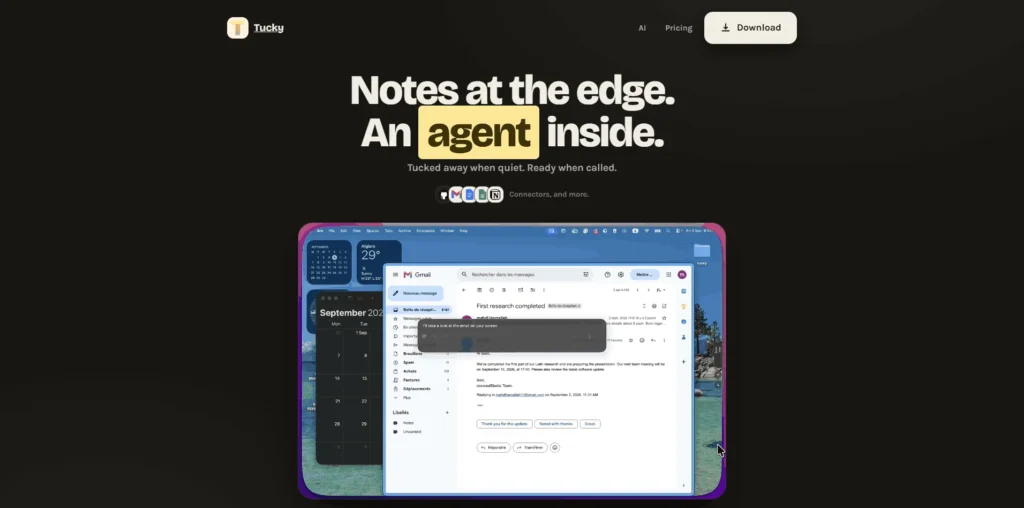
Tucky is a note-taking app for Mac that keeps your notes docked to the edge of your screen so they are always available without getting in the way.
It combines quick notes with an integrated AI agent that can help you search, write, rewrite, and work with information from your notes.
Tucky goes beyond traditional sticky notes by letting you ask its AI directly from the edge of your screen.
Tucky Plans and Pricing
Tucky Use Cases
Quick Note Taking: Tucky keeps your notes available at the edge of your Mac screen, making it easy to quickly capture ideas, reminders, information, or tasks while working. This reduces the need to open a separate notes application every time you want to write something down.
AI-Assisted Writing: Tucky can help with writing and rewriting content directly from your workspace. This is useful when you need to draft messages, improve wording, summarize information, or make changes to existing text without repeatedly moving information between different applications.
Managing Tasks and Reminders: Tucky can be used as a convenient place to keep track of tasks and important information while working. Having notes readily accessible makes it easier to refer to your to-do items without interrupting your current workflow.
Working With Connected Apps: Tucky can work with information from connected services such as Gmail, Google Calendar, Google Docs, Google Sheets, GitHub, and Notion. This allows users to access and work with information from these services through the Tucky interface instead of constantly switching between multiple applications.
Searching and Working With Information: Tucky’s AI can help users search through and work with information in their notes. This is useful when you have accumulated a large number of notes and need to find specific information or use existing information while working on something new.
Who is Tucky ideal for?
Mac Professionals: Tucky is designed for Mac users who want quick access to notes and AI assistance while working. Its edge-of-screen interface makes it easy to capture information, ask questions, and work with notes without repeatedly opening and closing separate applications.
Writers and Content Creators: Writers can use Tucky to draft, rewrite, and refine content while keeping their notes accessible. Its AI assistance can help with everyday writing tasks, making it useful for creating and editing content without constantly moving between applications.
Knowledge Workers: Professionals who regularly work with information across different applications can use Tucky to keep important notes readily available. Its AI can also work with connected services, helping users access information from tools such as Gmail, Google Calendar, Google Docs, Google Sheets, GitHub, and Notion.
Developers and Technical Professionals: Tucky can be useful for developers who need to keep notes, instructions, and useful information accessible while working. Its connections with services such as GitHub and other productivity tools can make it easier to work with information without repeatedly switching applications.
Productivity-Focused Users: Users who want to reduce interruptions and application switching can use Tucky as an always-accessible workspace for notes and AI assistance. Keeping these tools at the edge of the screen makes it convenient to capture ideas, check information, and handle small tasks while continuing to work.
Tucky Key Features
Edge-of-Screen Notes
Integrated AI Assistant
AI-Powered Writing
AI-Powered Rewriting
Note Search
Keyboard Shortcut Access
Connected App Access
Gmail Integration
Google Calendar Integration
Local Encrypted Note Storage
Apple Notes: the obvious choice for Mac users who want a simple, built-in note-taking experience. It works seamlessly across Apple devices and is a strong option if you don’t need Tucky’s edge-docked interface or integrated AI workflow.
SideNotes: a good alternative for users who mainly want quick access to notes from the edge of their Mac screen. It focuses on keeping notes accessible without opening a full-sized application, making it one of the closer alternatives to Tucky’s core interface.
Unclutter: combines notes with a clipboard manager and file shelf in a single Mac utility. It is useful for people who want quick access to temporary information and files rather than an AI-focused note-taking experience.
Raycast: a powerful Mac launcher that can provide quick access to applications, commands, and AI-powered workflows. It is a better fit for users who want a broader productivity launcher rather than a dedicated edge-docked notes workspace.
Craft: a polished note-taking and productivity platform designed for creating documents, organizing information, and managing tasks. It is a stronger choice for users who need a more comprehensive workspace instead of Tucky’s lightweight, always-accessible approach.
Tucky is particularly differentiated by combining edge-docked Mac notes, local encrypted storage, and an integrated AI agent in one lightweight workflow. If you mainly need traditional notes, Apple Notes or Craft may be better, while SideNotes and Unclutter are closer alternatives for quick, always-accessible Mac notes.
Tucky alternatives and competitors
Why we can get Tucky
Be the first to know when Tucky LTD goes live!
At Prime, we do the impossible very often!
What LTD fans say about Prime Club:
Prime Club is my go-to for LTDs. Dev curates quality lifetime deals, including big brands like SpyFu. Excellent platform and great value!”
Prime Club definitely has a bright future and eventually will become the most trustable brand in the Lifetime deal community.
You’ll be the first to know the moment they launch!
Request for a Tucky lifetime deal
Be the first to know when we launch this deal
- Terms of use
- Privacy Policy
- ©2026 | Crafted with love