
Looking for Walkie Lifetime deal?
How to get the Walkie lifetime deal
If you would like to buy a lifetime deal on Walkie, make a request here. When the deal is live you will receive an email from us notifying you about it.
You can increase the chances of getting this lifetime deal by sharing this page with your friends and colleagues and encouraging them to make a request for Walkie LTD.
The more requests we have, the better the chances for us to get the deal for you.
Request
⇢
Share
⇢
Get Notified
Share with your friends to reach the goal!
Share and get your friends to request this deal to increase the chances of getting this lifetime deal
What is Walkie?
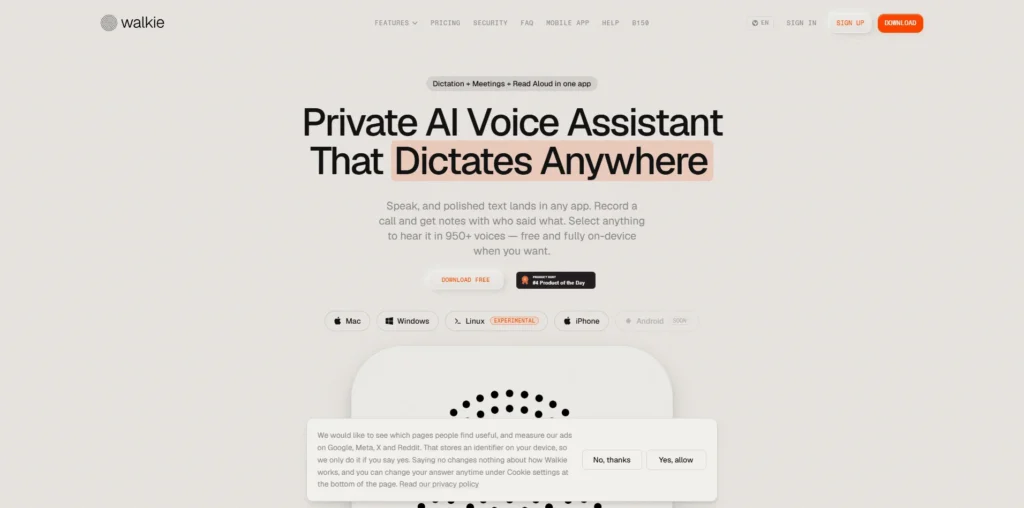
Walkie is an AI-powered voice assistant that lets you dictate polished text directly into the apps you already use.
Instead of typing everything manually, you can speak and have Walkie turn your speech into formatted text in apps such as Slack, Gmail, Notion, VS Code, and other text fields.
Walkie covers several voice-based productivity tasks, including speech-to-text dictation, AI-powered text cleanup and formatting, voice translation, read-aloud functionality, voice commands, and meeting recording and transcription.
Walkie Plans and Pricing
Walkie Use Cases
Voice Dictation: Walkie converts spoken words into text, allowing users to write emails, messages, documents, and other content simply by speaking. This can make everyday communication faster and more convenient than typing everything manually.
Writing Emails and Messages: Users can dictate emails and workplace messages directly into applications such as Gmail and Slack. Walkie can clean up and format the spoken input, helping users produce more polished written communication.
Creating Notes and Documents: Walkie makes it easy to capture ideas, notes, and longer pieces of content through voice. Users can speak naturally instead of stopping to type, making it useful for brainstorming, documentation, and quickly recording thoughts.
Meeting Recording and Transcription: Walkie can record meetings and transcribe conversations, helping users create written records of discussions. This can be useful for reviewing meetings later and capturing important information without manually taking notes throughout the call.
Voice-Based Coding and Technical Work: Developers can use Walkie to dictate coding prompts, documentation, and technical notes in supported applications such as VS Code. This allows them to use their voice as another way to interact with their development workflow.
Who is Walkie ideal for?
Professionals and Business Teams: Walkie is ideal for professionals who regularly write emails, messages, reports, and other business content. Voice dictation and AI-powered text processing help them communicate faster while reducing the need for manual typing.
Writers and Content Creators: Writers, bloggers, and content creators can use Walkie to capture ideas, draft content, and create written material through voice. This makes it easier to turn spoken thoughts into structured text while working on creative projects.
Developers and Technical Teams: Developers can use Walkie for voice-based coding prompts, technical documentation, and notes within supported development applications. This can help them communicate ideas and instructions without constantly switching between typing and other input methods.
Students and Researchers: Students and researchers can use Walkie to capture notes, dictate drafts, record ideas, and transcribe meetings or discussions. Voice-based input can be particularly useful when they need to capture information quickly.
Teams and Meeting-Heavy Professionals: Professionals who spend significant time in meetings can use Walkie for meeting recording and transcription, helping them maintain written records of discussions and reduce the need for manual note-taking.
Walkie Key Features
Voice-to-Text Dictation
On-Device Transcription
AI Text Formatting and Cleanup
Meeting Recording and Transcription
Read Aloud with AI Voices
Voice Translation
Voice Commands
Custom Dictionary and Snippets
App-Aware Text Formatting
Multiple Speech Recognition Models
Wispr Flow: a voice-to-text tool designed to help users dictate and edit text quickly across the applications they already use.
Superwhisper: an AI transcription and dictation tool that converts speech into text and supports voice-based workflows across desktop applications.
MacWhisper: a popular transcription application for Mac that uses speech recognition to transcribe audio, meetings, and recordings.
Otter.ai: a well-known AI meeting assistant focused on recording, transcribing, summarizing, and extracting information from conversations.
Dragon Professional: an established speech-recognition solution designed for professional dictation and voice-controlled computer workflows.
Walkie is a versatile voice productivity tool focused on turning speech into polished text, transcribing conversations, and helping users work faster across their everyday applications. Its alternatives offer similar voice and transcription capabilities, with different strengths in dictation, meeting transcription, AI editing, and professional voice workflows.
Walkie alternatives and competitors
Why we can get Walkie
Be the first to know when Walkie LTD goes live!
At Prime, we do the impossible very often!
What LTD fans say about Prime Club:
Prime Club is my go-to for LTDs. Dev curates quality lifetime deals, including big brands like SpyFu. Excellent platform and great value!”
Prime Club definitely has a bright future and eventually will become the most trustable brand in the Lifetime deal community.
You’ll be the first to know the moment they launch!
Request for a Walkie lifetime deal
Be the first to know when we launch this deal
- Terms of use
- Privacy Policy
- ©2026 | Crafted with love