Looking for CMDK Lifetime deal?
How to get the CMDK lifetime deal
If you would like to buy a lifetime deal on CMDK, make a request here. When the deal is live you will receive an email from us notifying you about it.
You can increase the chances of getting this lifetime deal by sharing this page with your friends and colleagues and encouraging them to make a request for CMDK LTD.
The more requests we have, the better the chances for us to get the deal for you.
Request
⇢
Share
⇢
Get Notified
Share with your friends to reach the goal!
Share and get your friends to request this deal to increase the chances of getting this lifetime deal
What is CMDK?
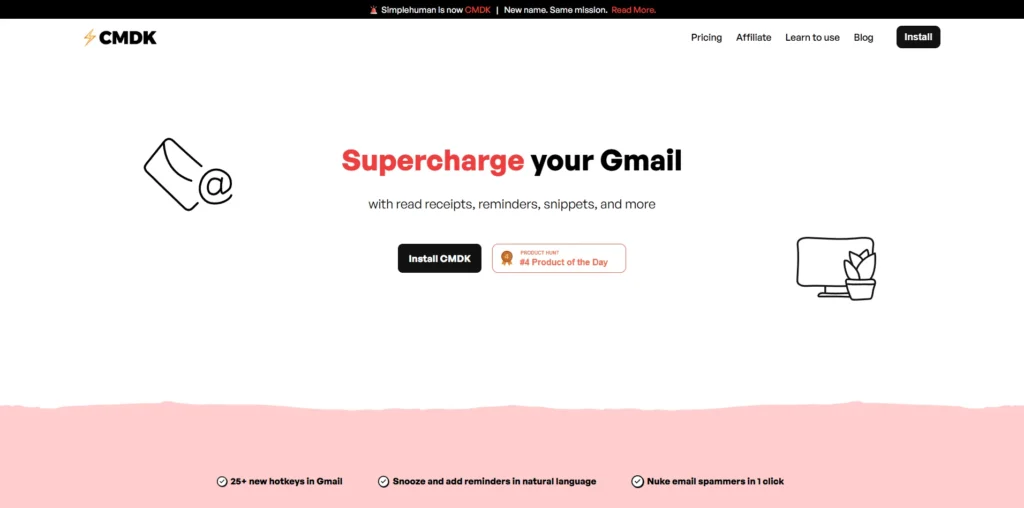
CMDK is a Gmail productivity extension that turns Gmail into a keyboard-first email workspace.
It adds a command bar, advanced keyboard shortcuts, reminders, read receipts, snippets, inbox tabs, and other tools designed to help users manage email faster without constantly reaching for the mouse.
CMDK covers several parts of everyday email management, from navigating and organizing an inbox to composing messages, scheduling reminders, tracking email opens, inserting reusable snippets, switching between Gmail accounts, and quickly performing actions such as archiving, deleting, or marking emails as read.
CMDK Plans and Pricing
CMDK Use Cases
Faster Inbox Management: Users can manage everyday Gmail actions such as archiving, deleting, labeling, marking messages as read or unread, and composing emails through keyboard shortcuts and the command bar. This reduces the need to constantly switch between the keyboard and mouse.
Email Follow-Ups and Reminders: CMDK lets users snooze emails and set reminders using natural-language instructions. This is useful for salespeople, executives, and professionals who need to remember when to revisit an email without keeping it sitting in the inbox forever like an abandoned responsibility.
Sales and Outreach: Sales teams can use CMDK’s read receipts to see when sent emails are opened or reopened. This can help salespeople identify when a prospect has engaged with an email and decide when a follow-up may be appropriate.
Reusable Email Templates: Users who frequently send similar messages can create email snippets with reusable text and variables such as names or dates. Snippets can then be searched and inserted while composing an email, making repetitive communication considerably faster.
Managing Multiple Gmail Accounts: CMDK allows users to switch between different Google accounts using its command bar and keyboard shortcuts. This is useful for people managing separate personal, work, client, or business inboxes
Who is CMDK ideal for?
Sales Professionals: CMDK is ideal for sales professionals who spend a large part of their day managing prospect emails and follow-ups in Gmail. Keyboard shortcuts, reminders, snippets, and read receipts can help them handle repetitive email tasks more efficiently.
Founders and Executives: Founders and executives who receive a high volume of email can use CMDK to navigate and manage their Gmail inbox faster. Its command bar and keyboard-first workflow make it easier to perform common actions without constantly switching between the keyboard and mouse.
Customer Support Teams: Support professionals can use CMDK to manage large volumes of customer conversations more efficiently. Keyboard-driven navigation, reusable snippets, and inbox organization can help speed up repetitive responses and everyday email management.
Freelancers and Consultants: Freelancers and consultants often manage multiple clients and conversations through email. CMDK can help them organize their inboxes, create reusable responses, set reminders, and quickly switch between different Gmail accounts.
Google Workspace Users: Teams and individuals who rely heavily on Gmail or Google Workspace can use CMDK to add a more keyboard-focused workflow to their existing email environment. This allows them to improve their Gmail workflow without moving to an entirely different email client.
CMDK Key Features
Command Bar
80+ Keyboard Shortcuts
Natural-Language Reminders and Snooze
Read Receipts
Split Inbox Tabs
Email Snippets
One-Click Spam Cleanup
Multiple Gmail Account Switching
Keyboard-Based Inbox Navigation
Keyboard Shortcut Nudges
Superhuman: one of the strongest alternatives to CMDK for users who want a premium, keyboard-first email experience. It offers fast email triage, command-based workflows, snippets, reminders, AI features, and support for both Gmail and Outlook, although it replaces your existing email interface rather than working directly inside Gmail.
Shortwave: a strong choice for Gmail users who want AI-powered email management alongside a fast workflow. Its AI assistant can search email history, summarize conversations, and help draft messages, making it more focused on AI than CMDK.
Spark: a good all-round email productivity tool for individuals and teams. It supports Gmail and Outlook and focuses on smart inbox organization, collaboration, and AI-powered email features, making it particularly useful for teams managing shared email workflows.
Missive: probably the better option for teams that need to collaborate directly around email. It combines shared inboxes, assignments, internal conversations, and email management, making it more suitable for support and operations teams than users who simply want faster personal Gmail navigation.
SaneBox: a good alternative if your main problem is inbox clutter rather than keyboard speed. It works with Gmail and Outlook and focuses on automatically filtering, organizing, and prioritizing incoming email rather than replacing the entire email interface.
Overall, CMDK is best suited to Gmail users who want a faster, keyboard-driven workflow without leaving standard Gmail. Superhuman is stronger for premium speed and AI across Gmail and Outlook, Shortwave is better for AI-heavy workflows, Spark is a stronger all-rounder for individuals and teams, Missive is better for shared inbox collaboration, and SaneBox is better for automated inbox filtering.
CMDK alternatives and competitors
Why we can get CMDK
Be the first to know when CMDK LTD goes live!
At Prime, we do the impossible very often!
What LTD fans say about Prime Club:
Prime Club is my go-to for LTDs. Dev curates quality lifetime deals, including big brands like SpyFu. Excellent platform and great value!”
Prime Club definitely has a bright future and eventually will become the most trustable brand in the Lifetime deal community.
You’ll be the first to know the moment they launch!
Request for a CMDK lifetime deal
Be the first to know when we launch this deal
- Terms of use
- Privacy Policy
- ©2026 | Crafted with love