Looking for Harbor Lifetime deal?
How to get the Harbor lifetime deal
If you would like to buy a lifetime deal on Harbor, make a request here. When the deal is live you will receive an email from us notifying you about it.
You can increase the chances of getting this lifetime deal by sharing this page with your friends and colleagues and encouraging them to make a request for Harbor LTD.
The more requests we have, the better the chances for us to get the deal for you.
Request
⇢
Share
⇢
Get Notified
Share with your friends to reach the goal!
Share and get your friends to request this deal to increase the chances of getting this lifetime deal
What is Harbor?
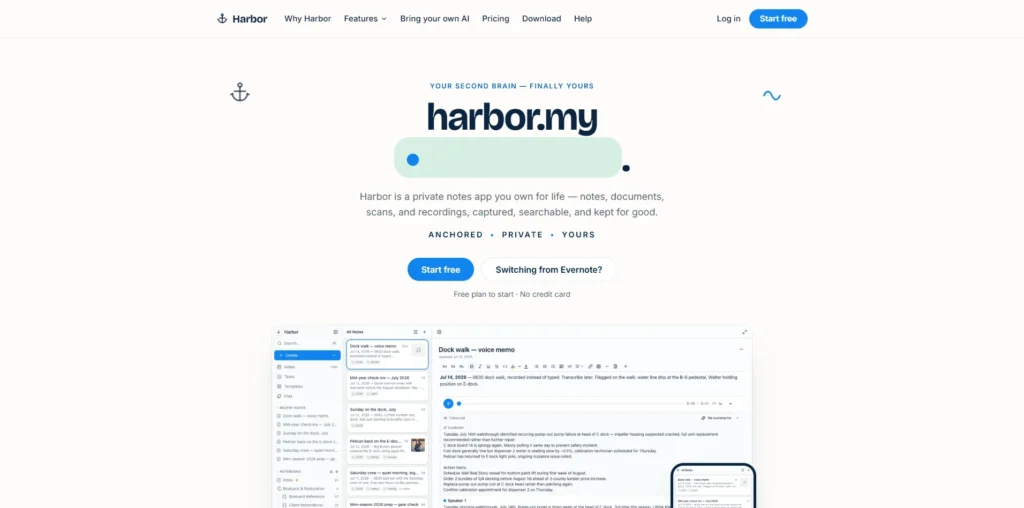
Harbor is a private notes and personal knowledge management app that helps users keep their notes, documents, scans, photos, recordings, and web content in one searchable place.
It works across devices and supports offline use, making it easier to capture and access information wherever you are.
Harbor covers several pieces of personal knowledge management, from creating notes and notebooks to capturing scanned documents, photos, audio, handwriting, and web clips.
Harbor Plans and Pricing
Harbor Use Cases
Personal Note-Taking: Harbor lets users create and organize notes in notebooks, making it useful for capturing ideas, plans, meeting notes, and everyday information. Users can keep their notes accessible across their devices and continue working even when offline.
Research and Knowledge Management: Researchers and knowledge workers can use Harbor to collect notes, documents, web clips, images, and other useful information in one place. Its search capabilities make it easier to find information across a growing personal knowledge library.
Document and File Organization: Harbor can be used to store scanned documents, photos, PDFs, and other files alongside notes. OCR-powered search helps users find text within supported documents and images without manually opening each file.
Tasks and Reminders: Users can manage tasks and reminders alongside their notes and other information. This makes Harbor useful for keeping action items, personal plans, and important follow-ups connected to the information they relate to.
Capturing Web Content: Harbor lets users save web clips and other online information for later reference. This is useful for collecting articles, resources, references, and other web content as part of a personal knowledge management workflow.
Who is Harbor ideal for?
Researchers and Students: Harbor is useful for researchers and students who need to collect and organize notes, documents, web clips, and reference material in one place. Its search capabilities make it easier to retrieve information when working on assignments, research projects, or long-term study.
Professionals and Knowledge Workers: Professionals can use Harbor to manage meeting notes, ideas, documents, tasks, and other work-related information. Keeping these resources together helps create a centralized personal knowledge base that can be accessed across devices.
Writers and Content Creators: Writers and content creators can use Harbor to collect research, web content, images, notes, and ideas for future projects. This makes it easier to keep source material organized and retrieve useful information when developing new content.
People Moving from Other Note-Taking Apps: Harbor can be useful for users who want to consolidate information from other note-taking platforms. Its import capabilities allow users to bring existing notes and related content into a centralized workspace.
Privacy-Conscious Users: People who prioritize privacy can use Harbor to keep personal notes, documents, and other information in a private knowledge management environment. Its optional encryption features provide an additional layer of privacy for users who want greater control over their stored information.
Harbor Key Features
Notes and Notebooks
Tasks and Reminders
Document and Photo Capture
Audio Recording and Transcription
Web Clipper
OCR-Powered Search
Offline Access
Cross-Platform Sync
Zero-Knowledge Encryption
API, CLI and MCP Integration
Evernote: one of the established note-taking platforms, offering tools for capturing notes, documents, web content, and tasks in an organized workspace.
Obsidian: a flexible knowledge management app built around local Markdown files, making it useful for building connected personal knowledge bases and organizing research.
Notion: an all-in-one workspace that combines notes, documents, databases, tasks, and project management for individuals and teams.
Joplin: an open-source note-taking and to-do application that supports Markdown, notebooks, attachments, synchronization, and privacy-focused workflows.
Bear: a writing and note-taking app focused on organizing notes with tags, Markdown support, attachments, and a clean writing experience, particularly for Apple users.
These Harbor alternatives offer different approaches to note-taking, personal knowledge management, document organization, and task management. The right platform depends on whether your priority is privacy, flexible knowledge management, connected notes, or an all-in-one workspace.
Harbor alternatives and competitors
Why we can get Harbor
Be the first to know when Harbor LTD goes live!
At Prime, we do the impossible very often!
What LTD fans say about Prime Club:
Prime Club is my go-to for LTDs. Dev curates quality lifetime deals, including big brands like SpyFu. Excellent platform and great value!”
Prime Club definitely has a bright future and eventually will become the most trustable brand in the Lifetime deal community.
You’ll be the first to know the moment they launch!
Request for a Harbor lifetime deal
Be the first to know when we launch this deal
- Terms of use
- Privacy Policy
- ©2026 | Crafted with love