
Looking for ScreenGeany AI Lifetime deal?
How to get the ScreenGeany AI lifetime deal
If you would like to buy a lifetime deal on ScreenGeany AI, make a request here. When the deal is live, you will receive an email from us notifying you about it.
You can increase the chances of getting this lifetime deal by sharing this page with your friends and colleagues and encouraging them to make a request for ScreenGeany AI LTD.
The more requests we have, the better the chances for us to get the deal for you.
Request
⇢
Share
⇢
Get Notified
Share with your friends to reach the goal!
Share and get your friends to request this deal to increase the chances of getting this lifetime deal
What is ScreenGeany AI?
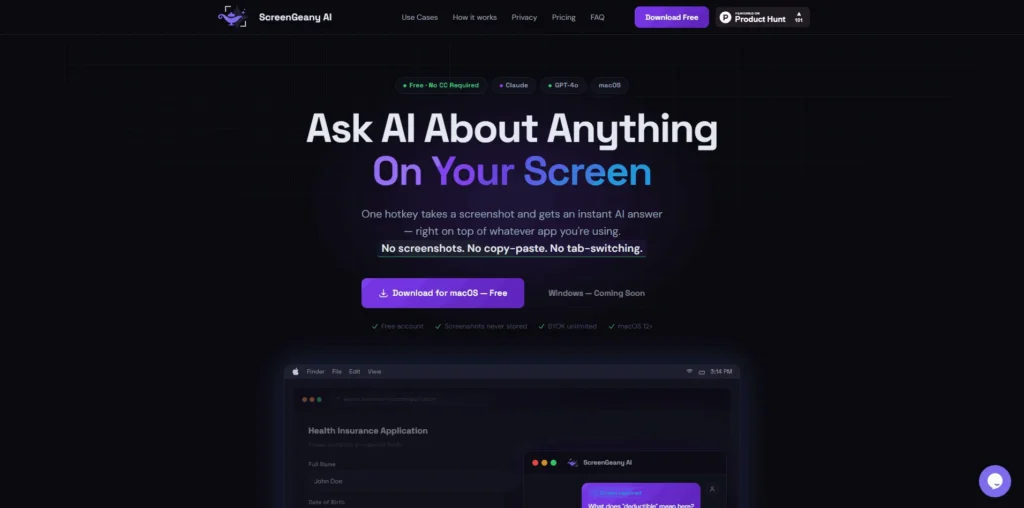
ScreenGeany AI is a screen-aware AI assistant that lets you ask questions about anything visible on your screen using a single hotkey.
It captures your screen context and instantly provides answers from AI models like GPT or Claude—without needing to switch tabs, copy-paste, or upload screenshots.
ScreenGeany AI simplifies everyday workflows by combining screenshot capture and AI assistance into one seamless step.
ScreenGeany AI Plans and Pricing
ScreenGeany AI Use Cases
Instant Screen-Based Q&A: If you’re stuck on something on your screen, ScreenGeany AI lets you ask questions instantly using a hotkey. It understands the context and gives you relevant answers without needing to copy-paste or explain manually.
Debugging Code Faster: Developers can use ScreenGeany AI to analyze errors, explain code snippets, and suggest fixes directly from what’s visible on the screen, reducing the time spent switching between tools.
Document Summarization: Whether it’s a PDF, article, or report, ScreenGeany AI can quickly summarize the content on your screen and extract key insights, saving hours of reading time.
Form Filling and Field Explanation: Confused about a form or field? ScreenGeany AI can explain what’s required and even help draft responses based on the context shown on your screen.
Writing Emails and Replies: You can draft emails, messages, or replies directly from your screen context. It helps create accurate and relevant responses without starting from scratch.
Who is ScreenGeany AI ideal for?
Developers and Programmers: ScreenGeany AI is perfect for developers who want to debug code faster and understand errors instantly. It analyzes what’s on your screen and provides context-aware explanations and fixes without switching between tools.
Customer Support Teams: Support agents can use ScreenGeany AI to quickly understand user issues from screenshots or live screens. It helps provide accurate guidance and resolve problems faster without long back-and-forth conversations.
Students and Learners: Ideal for students who need quick explanations of complex topics, ScreenGeany AI can break down concepts, summarize study material, and answer questions based on what’s visible on their screen.
Professionals and Knowledge Workers: From drafting emails to understanding documents and reports, professionals can use ScreenGeany AI to speed up daily tasks and reduce manual effort across different applications.
Freelancers and Consultants: Freelancers can use ScreenGeany AI to handle multiple client tasks efficiently—whether it’s research, writing, or troubleshooting—without losing time switching between tools.
ScreenGeany AI Key Features
One-Hotkey Screen Capture & AI Query
Context-Aware AI Answers From Screen Content
Always-On-Top AI Overlay Interface
No Copy-Paste Or Tab Switching Required
Multi-Model Support (GPT & Claude)
Privacy-First Screenshot Handling (RAM Only)
Real-Time Streaming AI Responses
Customizable Global Hotkey
Full-Screen And Multi-Monitor Capture
Cloud Conversation History & Session Continuity
ScreenApp: a growing tool that combines screen recording with AI summaries and insights.
Taskade: an all-in-one AI workspace that helps with notes, tasks, and real-time assistance.
Raycast: a powerful Mac productivity tool with AI features for quick commands, writing, and automation.
Microsoft Copilot: deeply integrated across Windows and apps, offering contextual AI help across workflows.
ChatGPT: a widely used AI assistant for answering questions, generating content, and solving problems (though not fully screen-aware by default).
These ScreenGeany AI alternatives offer a mix of AI assistance, productivity tools, and workflow automation depending on how you prefer to work. While they provide strong capabilities, ScreenGeany AI stands out with its real-time, screen-aware context that minimizes the need for manual input and tab switching.
ScreenGeany AI alternatives and competitors
Why we can get ScreenGeany AI
Be the first to know when ScreenGeany AI LTD goes live!
At Prime, we do the impossible very often!
What LTD fans say about Prime Club:
Prime Club is my go-to for LTDs. Dev curates quality lifetime deals, including big brands like SpyFu. Excellent platform and great value!”
Prime Club definitely has a bright future and eventually will become the most trustable brand in the Lifetime deal community.
You’ll be the first to know the moment they launch!
Request for a ScreenGeany AI lifetime deal
Be the first to know when we launch this deal
- Terms of use
- Privacy Policy
- ©2026 | Crafted with love