

Erlin AI Lifetime Deal : Be the brand AI

recommends

Erlin AI Lifetime Deal
lifetime access to Sidekick
Sidekick
Loader
Home / AI Agent Software / Sidekick Lifetime Deal

Looking for Sidekick Lifetime deal?

Your search ends here! Make a request for Sidekick LTD and we’ll try our best to make it available on Prime Club.
0 Upvotes | 0 Downvotes
0 Votes
Gist Integration form

How to get the Sidekick lifetime deal

If you would like to buy a lifetime deal on Sidekick, make a request here. When the deal is live, you will receive an email from us notifying you about it.

You can increase the chances of getting this lifetime deal by sharing this page with your friends and colleagues and encouraging them to make a request for Sidekick LTD.

The more requests we receive, the better the chances of getting the deal for you.

Request

Share

Get Notified

Lifetime access to {embed_post.meta.deal_name}
lifetime access to Sidekick
Share with your friends to reach the goal!

Share and get your friends to request this deal to increase the chances of getting this lifetime deal

share on facebook
share on twitter
share on whatsapp
share on Linkedin
Sidekick lifetime access

What is Sidekick?

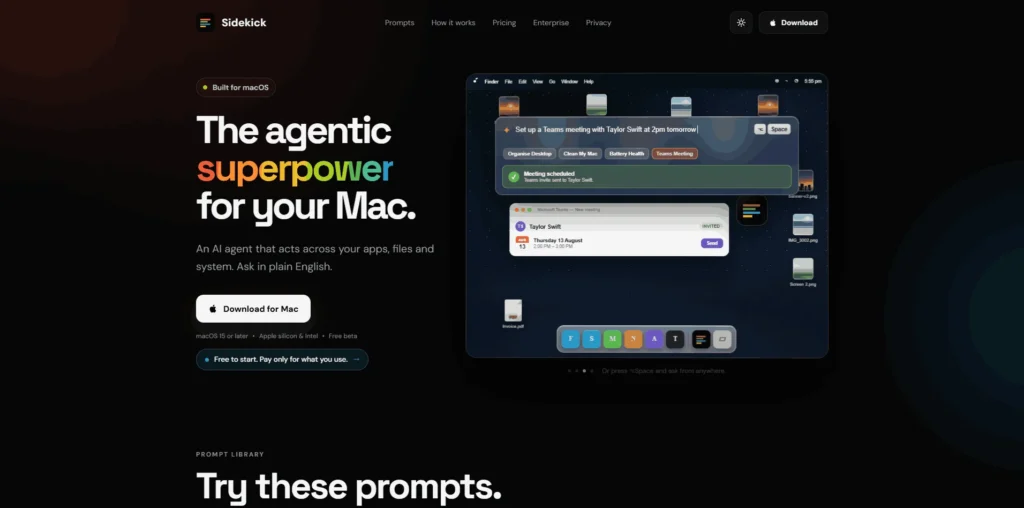
Sidekick is an AI agent for Mac that lets users control their apps, files, and system through plain-English instructions.

It can perform tasks such as organizing files, scheduling meetings, writing messages, converting media, managing PDFs, and retrieving system information.

Sidekick covers several parts of everyday Mac productivity, from finding and organizing files to automating repetitive desktop tasks and interacting with applications.

lifetime access to Sidekick
Sidekick
{embed_post.meta.deal_name} - plans and pricing

Sidekick Plans and Pricing

Sidekick’s pricing is designed to cater to individual Mac users and businesses looking to automate everyday computer tasks. It offers flexible plans with features for AI-powered desktop automation, productivity workflows, and enterprise endpoint operations. To check out the monthly and annual pricing, click on the button below.

Sidekick Use Cases

Sidekick is an AI agent for Mac that helps users automate everyday computer tasks across apps, files, and the system using plain-English instructions. It can organize files, schedule meetings, edit documents, manage PDFs, convert media, and simplify repetitive workflows.
lifetime access to Sidekick

File Organization: Sidekick can organize messy desktops and folders by sorting files into relevant groups. It can also rename files based on their content, helping users spend less time manually managing documents and media.

Meeting Scheduling: Users can ask Sidekick to set up meetings and fill in calendar invitations without manually navigating through calendar interfaces. This makes scheduling recurring meetings and calls faster.

Writing and Messaging: Sidekick can type directly into the application a user is working in. For example, users can ask it to draft or enter a reply, making repetitive communication tasks easier.

Mac Cleanup: Sidekick can identify items such as caches, duplicate photos, old installers, and application leftovers to help users clean up storage. It only deletes items when the user gives approval.

File and Media Conversion: Users can ask Sidekick to convert videos and images directly on their Mac. It can handle tasks such as converting MOV files to MP4, resizing images, extracting audio, and trimming video clips.

Who is Sidekick ideal for?

{embed_post.meta.deal_name} - Who is it for

Individual Mac Users: Sidekick is ideal for Mac users who want to automate everyday computer tasks using natural-language instructions. Instead of manually navigating through multiple applications, users can ask Sidekick to perform tasks such as organizing files, managing documents, and handling system actions.

Freelancers and Solopreneurs: Freelancers can use Sidekick to reduce time spent on repetitive administrative work. It can assist with tasks such as organizing project files, preparing documents, scheduling meetings, and handling routine computer operations.

Business Professionals: Professionals who regularly work across multiple applications can use Sidekick as an AI assistant for everyday workflows. It can help with tasks such as drafting messages, managing files, processing PDFs, and retrieving system information.

Content Creators: Content creators can use Sidekick for file and media management tasks, including converting media, resizing images, extracting audio, and organizing project assets. This can reduce the amount of repetitive manual work involved in managing content files.

Developers and Technical Users: Developers and technical users can use Sidekick to automate system-level and file-management tasks on their Macs. It can also help retrieve system information and perform supported troubleshooting and maintenance operations.

Sidekick Key Features

  • FeaturesNatural-Language Mac Control
  • FeaturesCalendar and Meeting Scheduling
  • FeaturesAI-Powered File Organization
  • FeaturesIn-App Text and Message Writing
  • FeaturesMac Storage Cleanup
  • FeaturesFile and Media Conversion
  • FeaturesPDF Management
  • FeaturesMac System Information Retrieval
  • FeaturesMac Troubleshooting and Repair
  • FeaturesOn-Screen Content Understanding

Raycast: a powerful Mac productivity tool that combines app launching, file search, system controls, extensions, and AI features in one interface.

Alfred: a long-standing Mac productivity app for launching applications, searching files, managing snippets, and creating custom workflows.

Keyboard Maestro: a Mac automation tool designed for creating advanced macros, shortcuts, and multi-step workflows.

Apple Shortcuts: Apple’s built-in automation tool for creating workflows that perform actions across supported apps and system features.

Spotlight: Apple’s native search and action interface for quickly finding files, launching applications, and performing system searches.


Sidekick stands out by focusing on AI-powered computer control through natural-language instructions, allowing users to ask an agent to perform tasks across apps, files, and Mac system functions instead of manually creating each workflow.

Sidekick alternatives and competitors

If you don’t have time to wait for a Sidekick lifetime deal, here are some recurring alternatives you can try:
{embed_post.meta.deal_name} alternatives and competitors

Why we can get Sidekick

At Prime, we shamelessly request successful SaaS companies to offer an LTD on our platform no matter how big they already are. Somehow this works for us. Our past record gives us hope that we can get the Sidekick lifetime deal, if we get enough requests on this page. Let us bring this gem for you.
lifetime access to Sidekick

Be the first to know when Sidekick LTD goes live!

Gist Integration form for hour glass
lifetime access to Sidekick

At Prime, we do the impossible very often!

LTDs launched by Prime Club

What LTD fans say about Prime Club:

Ken Moo Testimonial

Prime Club is my go-to for LTDs. Dev curates quality lifetime deals, including big brands like SpyFu. Excellent platform and great value!”

Ken Moo Testimonial
Ken Moo
SaaS Specialist
Sam Jesani

Prime Club definitely has a bright future and eventually will become the most trustable brand in the Lifetime deal community.

Sam Jesani
Sam Jesani
CEO at IBrand Digital
Request these LTDs and be the first to get notified when they go live!

You’ll be the first to know the moment they launch!

Deal launched

Request for a Sidekick lifetime deal

Be the first to know when we launch this deal

Gist Integration form

Need lifetime access?

Gist Integration form for header section

Be the brand that AI recommends